Bypass Most Firewalls [Surf from Schools, Offices] without Proxy Sites

Wednesday, January 11, 2012

Hi Readers, In previous post I discussed about how to open blocked websites from schools and offices with the help of proxy servers. So in this post I will show you how to bypass internet firewalls without use of any proxy sites. This may not work on some blocked sites but it should work most of the time.

We can access website through the IP address rather than the website address itself. To do this we need to find the IP number for a particular website.
To find out the IP address of a website, open up command prompt and type :
Ping websitename (i.e ping google.com)
Examples : 
  • 74.125.236.49 for google.com
  • 75.30.2.43 for yahoo.com
Once you have the IP number for the website you want, enter it into the address bar to be taken directly to the site. Depend upon how tech department is blocking you from accessing the internet will depend on how much luck you have.

    Please Recommend Us On Google     


    Watch Youtube Videos in Higher Quality

    Monday, January 9, 2012

    Hey Readers !! Now this trick will show you , how to view any Youtube videos in higher quality.


    Look up a video on Youtube and then in the URL address bar add this code onto the end.


    &fmt= 18
    So, as for Example : 
    www.youtube.com/watch?v=OAXTCnux

    would become

    www.youtube.com/watch?v=OAXTCnux&fmt= 18

    Now load both these videos and check the difference in quality.


    Please Recommend Us On Google     


    How To Change Your Processor Name

    Friday, January 6, 2012

    Sometimes we fell ashamed to say our computer is having poor features like Pentium or Core 2 Duo processor. Some of my friends even force their parents to buy latest processors which are very costly  that they can't afford. So for them I am present with the new Trick.

    Think a situation when some of your friends visits you and check your system and they will be shocked by seeing your latest version processors.


    Follow the steps for this Trick :
    • Goto Start - Run.
    • Type Regedit.
    • HKEY_LOCAL_MACHINE
    • HARDWARE
    • DESCRIPTION
    • SYSTEM
    • CENTRAL PROCESSOR
    • On Right Hand Side Right Click on ProcessorNameString
    • And then write anything that U want.


    Please Recommend Us On Google     


    How to Activate Hidden Administrator Account in Windows 7

    Hello CS Readers, Here I am back with another trick which allows you to access hidden Administrator account in windows 7. I am sure you will be amazed after completing this trick. 


    Yes !!! You can activate the Hidden Administrator Account in Windows 7, Just follow the Steps :


    • Goto Start and Right click on My Computer.
    • Click Manage.
    • Now Expand the local users and groups option and choose users folder.
    • Select administrator and choose properties 
    •  Unchek the option Account is Disabled.
    • Click OK.


    Please Recommend Us On Google     


    How to open Blocked Websites from School and Office

    Wednesday, January 4, 2012


    Hey Readers !! I am back with some 'free proxy surfing websites' , through which u can visit blocked websites in schools and offices.


    Check out this lists of proxy websites that let you access blocked websites :


    Click Here For Free Mobile Recharge

    Play Hidden Tetris game in uTorrent

    Hey CS Readers, Most of us are using uTorrent for downloading big files because it support resume function. But did you ever thought that you can play tetris game inside uTorrent at the same time when you downloading your files also.

    Do you want to play Tetris Game on uTorrent ???? Sound weird but its true !

    * You must have uTorrent installed on your pc for this trick.


    Steps To Follow :

    • Launch uTorrent . 
    • Goto Help and Click 'About uTorrent'. 
    • Now press the letter 'T' in Keyboard. 
    Enjoy !! You have now unlocked the Tetris Game.

      Please Recommend Us On Google     


      Basics of Using Facebook Timeline

      Sunday, January 1, 2012

      If you were on the Internet today, you saw that Facebook released their Timeline profile to everyone. While you may have some sort of opinion about the Timeline, it�s here. There are a lot of really cool features and customizing you may want to get the hang of before it�s forced on you and you are playing catch-up.

      There are actually a few cool things about this update. It is not only on desktop, it is also on mobile too. But before we get a head of ourselves, we need to activate your Timeline.


      ACTIVATING FACEBOOK TIMELINE :

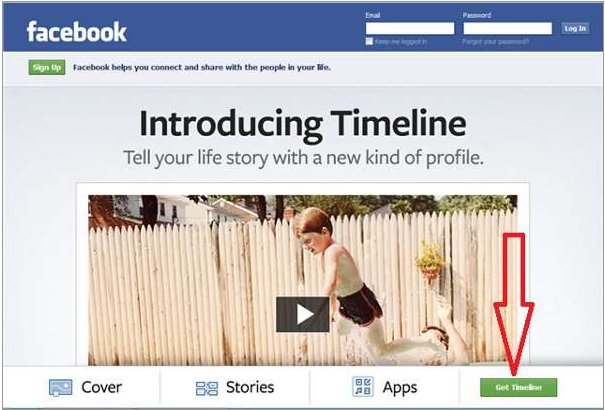
      You can Activate your Fcebook Timeline by Clicking Here.

      Click on the link in the bottom left of the Page as shown in below screenshot :


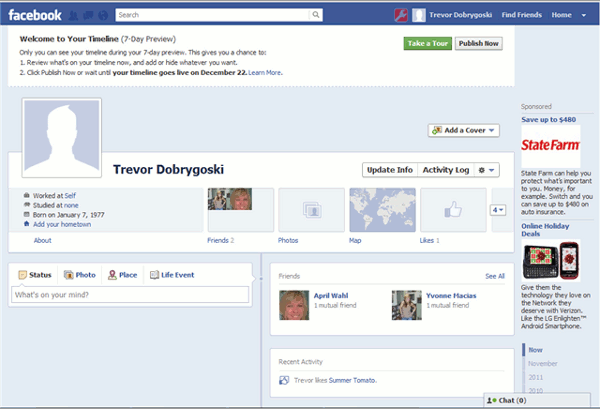
      Once you activate the Timeline, your page will refresh. You will need to click on your profile to see the major changes.


      HOW TO START :

      Just go through the tour. It will give you a good knowledge regarding Timeline. You will get an idea of how to add new pictures in Cover Page.

      WHAT IS A COVER PAGE :

      Timeline Cover Page is something like a background image in Twitter and Myspace. Only difference is, the cover is the header for your page. Your profile picture will appear in the bottom left corner. There are some people who are already crafting some really creative covers. Follow these two sites if u want to experienced the timeline in a different way.

      Below is the Screenshot of a Cover Page, How it looks.


      HOW TO ADD A COVER :

      Depending upon you, you can use a cover from a site or your own pictures. You will need to click on the Add a Cover link in the top right of your profile header.


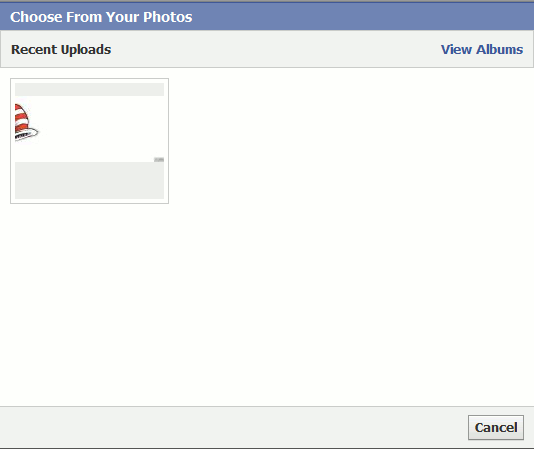
      You will just need to select the picture, either by uploading it or you can use your photo library of your Facebook.


      Once you have the picture ready and selected, you will need to drag it into the correct location. If you are doing something more creative, this will make it easier to make a fun cover.


      HOW TO USE TIMELINE :

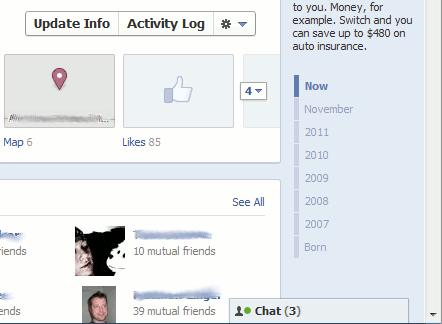
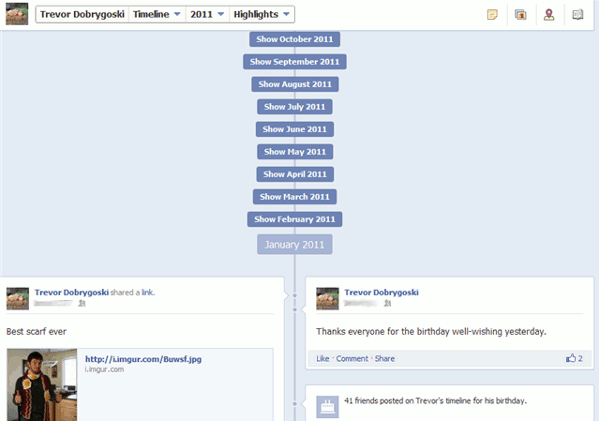
      You already got some idea about your profile page to see how the Timeline looks like. It looks totally different !!! Well you or your friends can skip through your past updates. On the right side you will see a little timeline. You can use this to skip through your Facebook past.


      When you click on a month or a year, you can see the highlights for that time.


      You can also see all of the posts from your past by clicking the drop down menu.


      HOW TO PROMOTE OR HIDE YOUR OLD POSTS :

      There are always pictures or things in your updates that you don't want to relive or show off . If you want to hide these posts from the timeline, there is a pencil icon next to each post in your timeline, if you click on it, you are given the option to hide it or even change the date.


      If you would like to promote an update you are proud of, you can click the star, this will stretch the post across the full length of the timeline. If you click the star again, you will minimize again.

      PRIVACY SETTINGS :

      There is an option in the privacy setting tab to limit what the public and friends of friends can see. You can change this if you are not comfortable with people Facebook stalking you.


      Hope you like this tutorial of Facebook Timeline. Plz pass on comments if you are facing any problems.

      Don't forget to share this.


      Please Recommend Us On Google