How To Delete All Facebook Messages In A Single Click

Saturday, September 14, 2013

Here is back to back Facebook tricks just for CS Tricks visitors. As we all know that If you want to delete all message then we have to click one by one manually because Facebook does not allow to delete bulk of messages in a click. If you want to delete all Facebook messages and trying to make facebook message box to Zero then you have to do lot of hard work and if you have lot of friends then its next to impossible to delete all messages one by one.

So after a lot of hard work of coding, I successfully created a script which will help you to delete millions of messages in a single click. 

So Follow Below steps correctly and use this script only in Google Chrome or Mozilla Firefox.

How to Delete All Facebook Messages In A Click :


  • Login to Facebook .
  • You can select your choice of message for deletion, like if you want to delete only unread messages then click on More just above Messages option and select unread. Follow below image for demo ??

  • Now here comes the main part of i.e task of javascript. for using this script, you have to bookmark it .
  • Now drag and drop below image in your bookmark bar. If your bookmark is not visible then press CTRL+SHIFT+B in chrome to make it visible and then drag below image.


Delete Facebook Messages

  • Now your all task is done, just click on bookmark which you have just created.
  • Bravo !! You have successfully deleted your all messages in a click.
Note : Use this trick after thinking twice because you will not get back your deleted facebook messages.


How To Create a Nameless Page or Group In Facebook

Friday, September 13, 2013

Here is one of the exclusive trick of the year. After getting lot of requests regarding facebook trick through which we can create a Nameless Facebook Page or Group, Yes in this tutorial I am going to guide you to How to create a Facebook page or Group without any Name. 


Most of you already seen some pages which doesn't have any name, but first time over Internet, i am going to show you an amazing trick by which you can create a Nameless facebook group.

Follow below given steps correctly and read each and every sentence sharply else you will not get any success in this trick.

Before proceeding with full steps, let me tell you some compulsory things which you must have to follow :

1) For getting success in this trick, you must have to use Mozilla Firefox Browser Ver 20 or More.

2) You can only edit any page and create that page without name, that means you can't create nameless page, you have to create page with any name after that follow below steps for hiding that name.

3) You can only edit your page if you have likes below 200.

Steps To Follow ( Only In Mozilla ):


?? How To Create Nameless Facebook Page ??

  • Goto your desired page and click on Edit Setting or Update Page Info.

  • Now click on Edit Link in from of Page name area and now you can see a input area for your page name.
  • Now Here comes the main part, just copy below given code and paste it in page name area.

  • Now click on save changes.
  • Now after clicking on save changes, again repeat step 2 by clicking on edit in front of page name and follow below steps :
1) Press Left Arrow Key, Then Right Arrow Key, Then Delete Key -- Then Backspace.

Now Finally click on save Changes. Bravo !! Now you have invisible page name :D

Note : If your page has got still some name like dot marks or some "l" marks, then follow step 3 i.e press left, right, delete & space keys .

  • Now after following all above steps, you can see your page name input box as " Enter a Name For Your page". That means you have successfully completed all steps. Follow below image for demo look ??

Now you are a Admin of a Nameless page . Enjoy !!


?? How To Create Nameless Facebook Group ??


Note : Invisible Group name is only working in Mozilla Firefox, even you can see nameless group only in Mozilla Firefox, not in chrome. 

That means if you are opening same group in Google Chrome then it will be visible  .

Steps To Follow ( Only In Mozilla ) :

  • Goto Create Group and copy below given code and finally paste it in input area of Group name.

That's It !! Now You have Nameless group but it will only hidden in Mozilla Firefox, if you open same group in chrome then you can see your group name as a size of square boxes.


Hope You Liked this Trick, Do Comment For Any Types Of Queries.


How To Find & Change Mac Address In Windows

Thursday, September 12, 2013

Changing IP address is as easy like A,B,C.. but changing MAC ( Media Access Control ) is not easy. MAC address is basically a unique alphanumeric code that is used for network communication. It is assigned by network device manufacturer and stored in its hardware.

Usually MAC address based filtering is used for proxy servers and users can only access Internet on Computer with the specified MAC address. So in this tutorial, I am going to guide you about change MAC address in windows 7.

How to Find MAC Address in Windows 7 :

  • Goto Start -- Programs -- Click On Command prompt Or Directly write CMD in Run box and press Enter.
  • Now Type ipconfg/all in DOS and press Enter.
  • Now you will see your network details of Local Area Connection.
  • MAC ADDRESS is called Physical Address in Command Prompt.
  • Now search for PHYSICAL ADDRESS from there. Follow below given image for Demo ??

  • Now You have successfully Found your MAC/Physical Address.
Note : Physical Address for Local Area Network & Wireless Network are different.

How To Change MAC Address In Windows 7 :


You can change your MAC address by using MAC Address Changer Software. It allows you to change your MAC address in Windows 7, Windows 8 & Vista. By using below software, you can generate random MAC Address or you can write physically also as per your choice. After making the changes, you have to disable and then re-enable network connection to see changes in your previous and current MAC address.


Patna Brothers Launch New Social Networking Website To Compete With Facebook

Tuesday, September 10, 2013

After Facebook, its time to jump into jumpbook. Facebook has now got new competitor from India called Jumpbook. Two brothers, Nilay & Ankur Singh from Bihar, India have launched an all new social networking website jumpbook.in  to compete with Facebook. The brothers are operating from a one room apartment from patna. Two brothers who spoke to CNN-IBN said that their website offers a lot more features than Facebook does. 

Jumpbook is supposed to be a five-in-one according to the brothers. Besides basic sharing and posting, Jumpbook offers a marketplace, a quiz application, forum and a blog platform as well. Jumpbook seems to be a mashup of Facebook and Orkut and even looks very much similar to Mark Zuckerberg's website. Facing financial hardships, the two learnt website designing from a local computer institute. Nilay had quit his engineering course to let his brother complete his education. Since then the two have been working towards creating  Facebook's competition.


Ankur Singh told CNN-IBN " We are facing challenges on the financial side, we need funds to increase server capacity." . In the time frame of only four months, they attracted 25000+ users but their server crashed as it was not prepared to handle this capacity at a time. The two are now seeking investment to take their dream forward.

Nilay added, " We are planning to launch this on a huge scale and we need some investors to invest in our website so that we can market our website to a certain level to advance to a big entrepeneurs from Bihar."

There is no doubt that the website is in need of improvement. But you can upload pictures, write status messages, insert polls and even post songs on the site. Apart from these, you can search through classifields ads and connect with users you would like to purchase something off. There is also a game and apps section in the website . 


Join Jumpbook                                  Add Me On Jumpbook

How To Unlike All Facebook Pages In A Single Click

Sunday, September 8, 2013

After getting lot of requests in email and in my facebook id from my site visitors regarding unliking all facebook pages trick in a single click, here I am back with working trick which will help you to unlike all your facebook pages in a single click without wasting your valuable time. This script is fully spam free and its personally coded by me so you all can use it freely without worrying about hacking and phising attacks.

This script is totally based upon iMacro extension and you must have to use this extension for getting success . If you are not familiar with this extension or you don't have iMacro in your computer then download it from below link.


Download Now
Firefox Extn.
By ~ Ravi ~


Steps To Use For Unliking All Pages In A Single Click :

  • After successful installation of iMacros extension download script from below link.

Download Now
Script
By ~ Ravi ~

Password : cstricks
  • After downloading script, copy and paste it in iMacros folder  ( Ex: C:\users\select your user\MyDocument\iMacros\Macros )
  • Now login to facebook and click on iMacro extension. 
  • Now you can see that script which you pasted in 2nd step, just select it and run the loop by clicking play. Follow below image for demo look.

Now your task is fully completed, just sit and see the magic on unlike :D

Must Read : How To Leave All Facebook Groups In A Single Click .


Please Recommend Us On Google     


Add Me Fast Script For Earning Quick Points

Most of you already know about Add Me Fast, those who don't know what is this site about and how it works can proceed further for full details regarding this website.


Add Me Fast is a website which gives you Facebook Followers, Facebook Page Likes, Google + circles and much more things by earning points. This site is totally depend upon points means more you earn points then more likes or followers you get. You can earn points by liking others page via add me fast or following others. 

?? If anyone is still not joined awesome site then join it by clicking below link ??


You will get following things after joining Add Me Fast :

  • Facebook Likes.
  • Facebook shares.
  • Facebook Followers.
  • Facebook Post Like.
  • Facebook Post Share.
  • My Space Friends.
  • Google+ Circles.
  • Instagram Followers.
  • Instagram Likes.
  • Twitter Followers.
  • Twitter Tweets.
  • And Much More ...........

Now let's come to the point that how you can earn more points by using a script. Yes, by using this script you can earn around 5000 points daily .

How To use Script For Earning Unlimited Points.

  • For using this script, you must use Mozilla Firefox Browser & IMacros Extension.
  • Download IMacros Extension from below link.

  • Now restart your firefox, after that you will be able to see imacro extension sign on right side of your firefox browser. follow below image for demo look.


  • After successfull installation of IMacros extension, now its turn to download IMacro Script , Download it from below link.
Password : cstricks

  • After downloading script, extract it in Macros folder ( Ex: C:\users\select your user\MyDocument\iMacros\Macros )
  • Now goto Firefox browser and login into Addmefast website & click on iMacro extension.
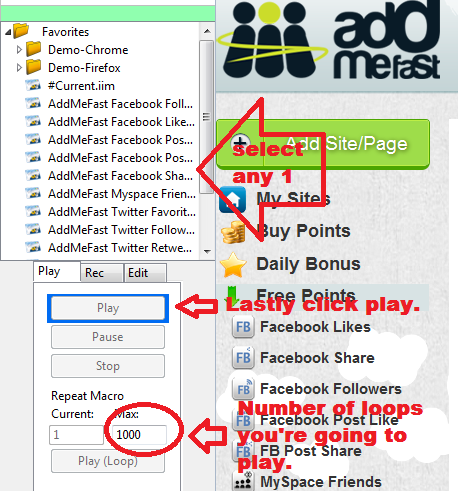
  • Now you can see those iMacros script which you copied in Macros folder, select any one script and write 1000 in Max column of Repeat Macro then finally click on play. Follow below Image for demo look.

Bravo !! You Did It !! Now you don't have to do any thing, just sit and watch the game of iMacro script. This script will automatically do your task and by using this, you can earn unlimited points.

Hope this tutorial will help you to grow your Page Likes, Followers, and much more... Feel free to comment below for any type of queries.

Must Read : Buy Facebook Likes, Followers & Much More From CS Tricks In Cheap Rate 


How To Download Paid Android Apps For Free

Saturday, September 7, 2013

Everyone loves to get anything in FREE, yes we all are always looking for some free stuffs over Internet, but some get success and some get failed. As always, Last night I was looking for some new applications in my smart phones and suddenly founds one car racking game but unfortunately that game was paid application . So finally I started to search some working tricks so that I can download all paid applications for free and lastly I got one awesome tool which helps me to download that paid car racing game without paying a single penny.

Follow Below Steps to Download Paid Apps For Free :

  • Download Blackmart Alpha Application From Below Link ??

  • After successfull download, Install it in your phone.
  • Open Google play store and search any paid application & note it down.
  • Now open Blackmart application & search that application which you noted in second step i.e name of paid application.
  • After getting search result of that paid application, just click on it and install it without paying a single penny.
Now You Have Successfully Installed Paid Application For Free. Enjoy Cracking With CS Tricks !!

Must Read : Free Unlimited Calls From PC To PC Or Android Device .


Please Recommend Us On Google