Top Website Owners Of India [ Earning, Position & Info ]

Monday, October 7, 2013

We all love to visit different websites but we never care about who the hell is owner or what's the story behind this website creation, that's why in this post I am going to give you full information of some top websites of India and I hope you all will love it. Here in this post you can find some hidden information about famous websites of India. Every person of the society has got his own wish and aim, some wants to become Doctor, Engineer but some tech enthusiast are always love to become blogger or website owner. Nowadays blogging is getting popular and everyone wants to create his own website but only some get success . So below you can find some success stories of website owners along with their photos, earnings and some hidden informations about their personal life.

Top Indian Website Owners Are :


??  JustDial ??


Owner : VSS Mani
Estimated Earnings : $5 Million / Year

Story Behind Success : VSS Mani is the true  example of middle class family. he dropped his CA studies and started his website bit late due to money problem. But somehow he arranged Rs.50000 from somewhere and and created his website. 


 ?? Way2SmS ??


Owner : VV Raju.
Estimated Earnings : $1.1 Million / Year.

Story Behind Success : After completing MCA from Nagarjuna University, he never turns back in his life. At first he started Way2sms on an ad supported model which is the most used bulk messaging service online in India and now his website is one of the famous tool for sending sms worldwide.

?? Ibibo ??


Owner : Ashish Kashyap.
Estimated Earnings : $1 Million / Year.

Story Behind Success : Ashish started his professional career with organisations like Google India and MTV. After leaving his job, he started his own website Ibibo and now he owns three top websites of India , Ibibo, Bixee and Tradus. 


?? Shaadi ??


Owner : Anupam Mittal.
Estimated Earnings : $5 Million / Year. 

Story Behind Success : In the year 1996 he thought to started matrimonial website just after seeing a pandit who come up with marriage proposal so he thought to why not go for online marriage proposal websites and from that day Anupam started to ran behind his dream website and now shaadi.com is one of the top matrimonial website of India. Currently shaadi.com have more than 10 million members and it is the No.1 matchmaking website in India. 


?? Rediff ??


Owner : Ajit Balakrishnan.
Estimated earnings : $40 Million / Year.

Story Behind Success : Ajit always wants to be football player but he landed himself in IIM Calcutta. In the year 1996 at the age of 42 years after working hard and getting full support from his wife, he invested Rs.2 crore and started his website rediff.com and he didn't get a single penny profit in first 3 years but now rediff is one of the Top websites of the world.


Hope you liked this hidden stories behind these successfull websites of India. Your comments are welcome for feedback.


How To Close All Running Applications In A Single Click

Sunday, October 6, 2013

Hello CS Tricks Readers, At First Happy Navratri To All. We all do lot of tasks in a single time but at the time of shut down , it takes lot of time to close all opened application manually so here is the trick or you can say software which will help you to close all running applications in a single click.

Close All is the software which will help you to close all applications in a single quick and it will do your task of closing in a seconds that means you don't have to wait. You just have to download this tiny software and create a shortcut on desktop and whenever you want to close all applications at once, just click on the shortcut which you created.

Steps To Follow :

  • Download Close All application from below link and extract it in your PC.


  • Now open the extracted files and run closeall.exe file to start the application.


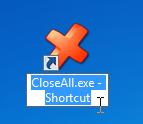
  • You can create shortcut to Desktop for quick launch.


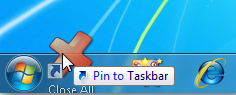
  • Best way is to Pin it to taskbar so that you desktop screen will also look fresh without hodge podge icons.

Now whenever you feel that you have to close all applications at once , just click on pinned icon of close all application and save your valuable time.

Hope this tutorial will helps you to saving your lot of time. Pass your valuable comments for any type of queries.


How To Download Torrent Files With IDM [[ 100% Working ]]

Saturday, October 5, 2013

Here your search comes END for downloading Torrent files with the help of Internet Download Manager. I personally hate  torrent downloads due to its slow speed that's why I was searching for alternative of downloading torrent files from so many days. In my previous post of downloading torrent files from idm, I suggested you to use Zbigz but now its not working so here is new alternative which is far better than zbigz.

Torrent is one of the main destination of movies. Here we can find almost every movies, songs & games, and the main part in torrent is that we can dowload any latest movie just after one day of release that's why torrent is also called as piracy center. let's forgot all about that and now come to the point of downloading torrent file with the help of Internet Download Manager.

Here in this tutorial we are going to use Furk.net for converting torrent download links into IDM. But apart from this, it got awesome features like you can stream video or listen your music from PC and smartphones or even a game console like XBOX.

Steps To Follow For Downloading Torrent Files With IDM :

  • At first, go and select your torrent file which you want to download with the help of IDM.
  • Now note down the link of that file or just download the .torrent file. 
  • After visiting, connect your facebook Account and allow its application for successful registration.
Note : Always select Facebook login to register because it requires verification code for creating account with email.


  • After successful registration, verify your email for availing all features and finally click on My Files then NEW.


  • After clicking on NEW, you will be redirected to new page. Now here you have to put downloading link of torrent which you copied in second step or you can upload .torrent file also.
  • After following these steps, finally click on ADD DOWNLOAD.


Bravo !! Downloading Started........... :D


I am sure you all loved this tutorial of Downloading torrent files with IDM. Feel free to comment for any type of queries and let us know how we are doing according to our tricks service.


Thank You for visiting and keep suggesting our website to your friends and enjoy this University Of Tricks.


Now Enjoy Facebook Messenger Inside Mozilla Firefox

Friday, October 4, 2013

Facebook Messenger is one of the simplest and easiest tool for surfing Facebook and it saves our lot of data also. Most of you already using messenger in Mobiles but did you heard that facebook messenger is also available for Mozilla Firefox latest versions. Yes, now you don't have to login to facebook for enjoying its features and chats, you can easily access facebook without opening facebook.com. 

Facebook launches its official meesenger for Mozilla firefox latest version browsers through which you can easily access all features and even you can also chat with your friends. For me, its working like a charm because it saves mine lot of data. This is the main reason why Firefox is one of the popular choice of all users because it got lot of addons which will very useful for us. 

Now enjoy facebook social API in Mozilla Firefox version 17.0 & above and it allows you to check notification & chat feature of facebook.

How To Use Facebook Messenger Inside Mozilla Firefox :

  • If you are using older version of Firefox then update it soon to version 17.0 or above.
  • Now click on Big Green TURN ON Button for activating Facebook Messenger inside Mozilla Firefox.

  • Now you have successfully added Facebook Messenger in Firefox.
  • After installation, you can see facebook logo in right side of your browser along with notification and message sign.

Now enjoy Facebook without opening facebook.com and enjoy this new feature of Facebook Messenger inside Firefox.

Comments are Welcome for any type of queries :)


Chang Login Screen Of Windows 7 Without Using Any Third Party Software

Thursday, October 3, 2013

Getting Bored after seeing same login screen everytime in your PC ?? Don't worry here is an alternative way of changing your login screen of Windows 7 and the main part is that we are not going to use any third party software or tool. Windows 7 has no option of changing login screen but here is the tool which is official tool  of windows 7 for changing login screen provided by withinwindows.

Steps To Follow For Changing Login Screen Of Windows 7 : 

  • At First Download official registry file of Windows 7 which is developed by withinwindows from below link.
  • Now extract it and run the registry file.
  • Now goto C:\Windows\system32\oobe.
  • Here create a New Folder rename it as info and again move  inside Info folder and create new folder and rename it as backgrounds.
  • Now its time to select your favourite image for login screen of windows 7. Copy your favourite image and paste it in info folder which you just created and then rename your image as backgroundDefault .
Note : Image size must be less than 256 KB and it should be in JPG format.
  • Now You're Done !! Just Restart Your PC and See The Effects .
Hope you enjoyed your new look of login screen of Windows 7 by using this awesome tool.


How to Find The Past Look Or Design Of Any Websites

Wednesday, October 2, 2013

We are in 2013, suppose if its possible for us to go back in the late 1970's then guess how it feels with those old looks, ofcourse it will feel awesome because we all love to find history of our past days. But here in this post I am not going to push you in the late 1970's but I will surely tell you the way of finding 1970's look of any website if it was present at that time. Let's take a look of your favourite website that how they look like 10 years ago compare to current look.

Here in this tutorial I am going to show you a awesome website which take crawling records of almost all websites which takes snapshot of websites in regular intervals of week or a month and you can also see the past look of any website including design and template. it is really a great tool for web designer to analyze any website that how it looks in past comparing to current look.

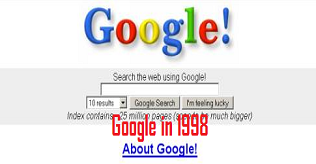
Wayback Machine is superb website which provides you history look of website along with snapshots. Check above image of Google in 1998 which I took from this website only. 


Just Visit Wayback Machine and put your website link which you want to view past look and finally click on Take Me back, then you will be redirected to a page with domain creation date and snapshots .

Hope by using this tool you can find some old looks of your favourite website so that you can compare the growth of design. Your comments will be appreciated, post your valuable words for any type of questions.


How to Create Disposable Website

Tuesday, October 1, 2013

After the amazing trick of Disposable Email Which Never Expires , here is another disposable trick which helps you to create disposable webpage as per your choice. Nowadays every newbies are trying to create their own website so this is the best way to start and learn about how to create and edit a webpage because it got all feature of editing, adding photos, adding links and much more things. You don't have to buy any hosting or domain for this, just signup and start designing your website and share it with your friends.

How It Works :

  • After visiting above link, create your account and verify it via email.
  • Now after successful verification, you will be redirected to home page of disposable webpage, just click on Create A Disposable Webpage.
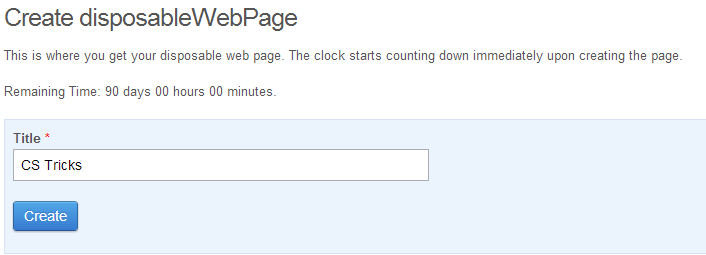
  • Now put your website Title as per your choice and finally click on Create.

  • In next window you will be redirected to a page editor window where you can post text and photos as per your choice.


  • Unfortunately you can use your website upto 90 days that's why its called Disposable Webpage because you can't use it for lifetime.
  • If you want to use your website for short period of time then you can set date & time in Disposal tab.
  • By default the page will remain up for 90 days.
  • Finally click on Publish and note down the link of your disposable webpage from address bar and send it to your friends.
Hope you enjoyed this post of Disposable Webpage Creation , write your valuable comments for any type of queries.